

What Is a Line of Credit (LOC)?
A Line of Credit (LOC) is a revolving loan—meaning you can borrow, repay, and borrow again.
It works more like a credit card than a traditional loan:
- You’re approved for a maximum amount
- You borrow only what you need
- You can repay and reuse the funds
- Interest is charged only on what you’ve used
Common examples:
- Business Line of Credit
- HELOC (Home Equity Line of Credit)
- Construction or Remodel Line of Credit
Should a Line of Credit Be in QuickBooks Online?
Short answer: 👉 Only if it’s tied to the business.
✔ Include it in QBO if:
- The LOC is in the business name
- Funds are used for business expenses
- A HELOC is being used to fund the business
- A remodel loan is for a business property
❌ Do NOT include it if:
- No business transactions flow through it
- It’s purely personal
- It’s for your primary residence
💡 Even if it’s a HELOC:
If it’s used for business → it belongs in your business books.
How to Set Up a Line of Credit in QuickBooks Online
If payments are processed through platforms like Square or QuickBooks
Step 1: Create the Liability Account
Go to: Chart of Accounts → New
- Account Type:
- Long-Term Liabilities (or Other Current Liabilities if paid within 12 months)
- Detail Type: Line of Credit
- Name: “Business Line of Credit – Bank Name”
💡 Tip: If you expect to pay it off within a year, classify it as a current liability.
Step 2: Record a Draw (Using the LOC)
When you pull funds into your checking account:
- Debit: Checking
- Credit: Line of Credit (Liability)
In QBO:
Record this as a Transfer from the LOC account to your checking account.
Step 3: Record LOC Payments (Principal + Interest)
LOC payments usually include:
- Principal
- Interest
In QBO:
Use Check or Expense, then split the transaction:
- Principal → reduces the LOC liability
- Interest → Interest Expense
💡 This step is critical for accurate financial reports.
QuickBooks term loan vs line of credit
Traditional Loan:
- Fixed amount
- Fixed payment schedule
- Set amortization
Line of Credit:
- Balance goes up and down
- Interest changes monthly
- Ongoing draws and repayments
Because of this, you’ll want to:
- Reconcile the LOC monthly
- Review statements carefully
- Separate principal and interest correctly
Can a HELOC be used for business purposes
If you’re using a HELOC (secured by your personal home) for business:
You should still record:
- The funds deposited into your business account
- The liability on your business books
- The interest as a business expense
However:
- The home itself is not recorded in QBO (unless it’s a business property)
💡 This is where clean documentation really matters.
Common Mistakes to Avoid
- ❌ Recording LOC draws as income
- ❌ Booking the full payment as interest
- ❌ Forgetting to reconcile the account
- ❌ Mixing personal and business transactions
When Things Get More Complex
You may need extra guidance if you have:
- Interest-only periods
- Variable interest rates
- Mixed personal + business usage
- Large remodel or construction projects
In these cases:
- A CPA may be needed
- Capitalization rules may apply
- Depreciation could come into play
Big Picture: How to Think About a Line of Credit
A LOC is:
- A cash flow tool
- Not income
- Still debt
- Something that requires consistent tracking and reconciliation
FAQs
What is a business line of credit?
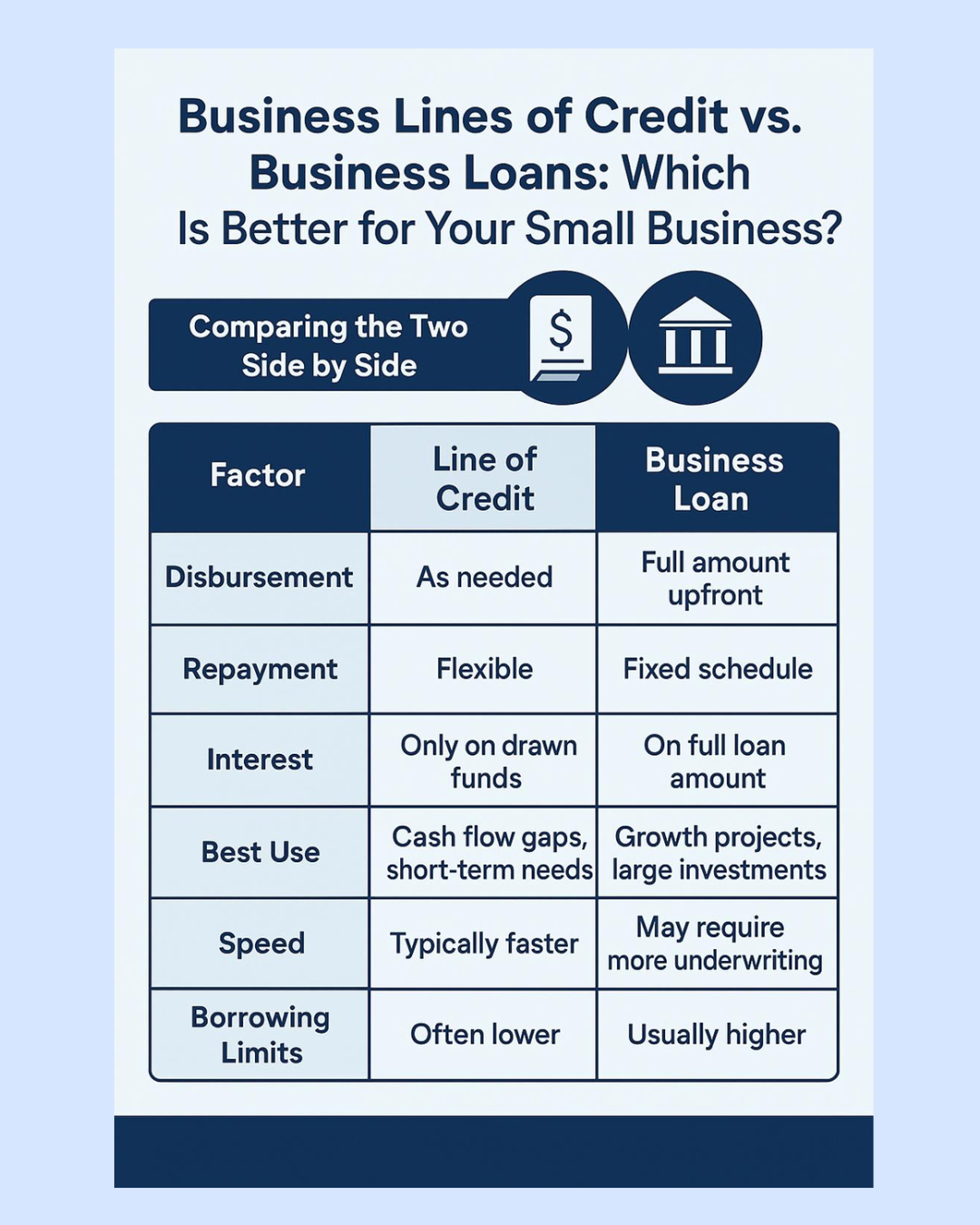
A business line of credit is flexible financing that lets a business borrow funds as needed up to an approved limit. Unlike a traditional loan, you do not usually receive the full amount all at once.
How do I set up a line of credit in QuickBooks Online?
In QuickBooks Online, a line of credit is usually set up as a liability account in the Chart of Accounts. This account tracks the amount your business owes on the line of credit. Intuit’s guidance for loans and lines of credit also points to using a liability account to track what the business owes.
How do I record a draw from a line of credit in QuickBooks Online?
A draw from a line of credit is usually recorded as money deposited into your bank account, with the category assigned to the line of credit liability account. This increases both your bank balance and the amount owed on the line of credit.
How is a line of credit different from a traditional loan?
A traditional loan usually gives you one lump sum with a set repayment schedule. A line of credit lets you draw money when needed, pay it back, and potentially borrow again up to the available limit.
How do you categorize a loan in QuickBooks
In QuickBooks Online, a loan is usually categorized as a liability, not income. You can set up a liability account to track what the business owes, then record loan payments with principal going against the loan balance and interest going to an interest expense account.
Is a line of credit considered current liability?
A line of credit is usually considered a current liability if you expect to repay the balance within one year. In QuickBooks Online, many businesses set it up as an Other Current Liability account so draws, payments, interest, and fees can be tracked separately from regular loans.
How do I record payments back to the line of credit?
To record a payment on a line of credit, enter the payment from your checking account and categorize the principal portion to the line of credit liability account. Any interest or fees included in the payment should be split out and categorized separately as an expense.
Can I transfer funds from my line of credit to my checking account?
Yes. When you draw funds from a line of credit and deposit them into your checking account, you can record it as a transfer or deposit in QuickBooks Online. The checking account increases, and the line of credit liability account also increases because the business now owes that amount back.
How do I record interest on a line of credit in QuickBooks Online?
Interest should usually be recorded to an interest expense account. This keeps the cost of borrowing separate from the principal balance owed.
What reports help me monitor my line of credit?
The Balance Sheet is the main report to monitor the outstanding balance of a line of credit. You can also review the Transaction Detail by Account report for the line of credit account to see draws, payments, fees, and interest activity over time.
What account type should I use for a line of credit in QuickBooks Online?
A line of credit is usually recorded as a liability account because it represents money the business owes. Depending on how soon it will be repaid, it may be set up as an Other Current Liability or Long-Term Liability.
Is a line of credit drawn income in QuickBooks Online?
No, a line of credit draw is not income. It is borrowed money, so it should usually increase a liability account instead of being recorded as sales or business income.
Should line of credit payments be categorized as an expense?
Only the interest portion of a line of credit payment is usually an expense. The principal portion reduces the loan or line of credit liability balance and should not be counted as a business expense.
How do I reconcile a line of credit in QuickBooks Online?
You can reconcile a line of credit by comparing the balance in QuickBooks to the lender’s statement. This helps confirm that draws, payments, interest, and fees were recorded correctly.
Can I track multiple draws from the same line of credit in QuickBooks Online?
Yes, multiple draws can be tracked through the same line of credit liability account. Each draw increases the balance owed, and each principal payment reduces that balance.
What mistakes should I avoid when recording a line of credit in QuickBooks Online?
Common mistakes include recording draws as income, recording the full payment as an expense, or not separating principal and interest. These errors can make your financial reports and tax records inaccurate.
Why is it important to set up a line of credit correctly in QuickBooks Online?
A correct setup helps your balance sheet show what the business actually owes. It also helps keep income, expenses, interest, and debt payments accurate for better bookkeeping and financial reporting.
more2heather@gmail.com | (206) 227-6128